Settings
Authorizations
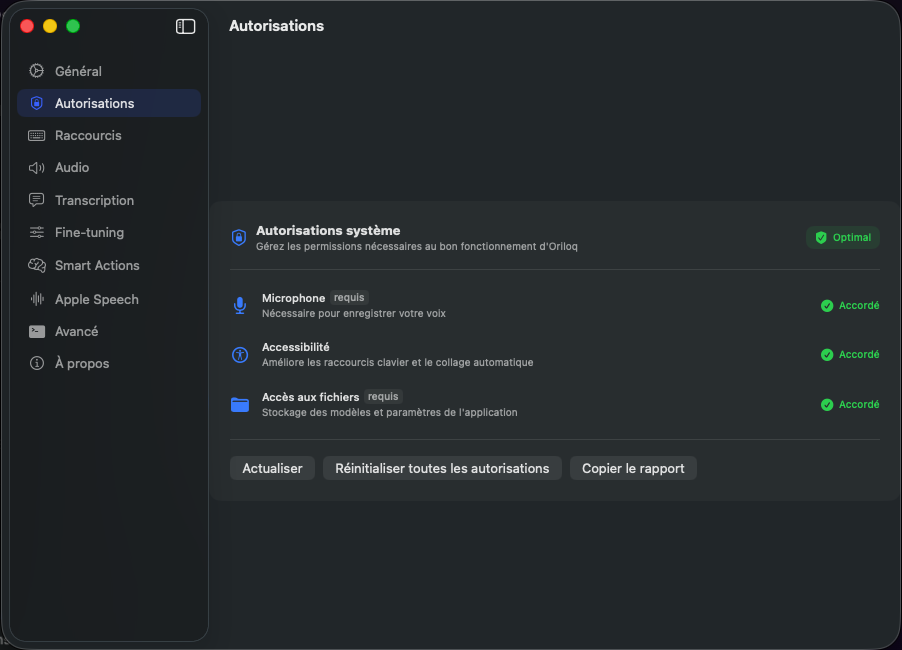
This page lets you verify that all permissions required for Oriloq to work properly have been granted.
Objective
Manage the system permissions required for Oriloq to function properly. Each authorization is listed with its current status.
Microphone
The Microphone permission is required. It allows Oriloq to record your voice for real-time transcription.
Accessibility
The Accessibility permission improves keyboard shortcuts and automatic pasting of transcribed text into the active field.
File Access
The File Access permission is required. It allows storing models and application settings on your device.
Authorization status
Each authorization displays a status: Granted (green checkmark) when active. The global indicator at the top right shows Optimal when all required authorizations are in place.
Available actions
Three actions are available at the bottom of the screen:
• Refresh — Refreshes the view to check the current status of authorizations after changes in System Preferences.
• Reset all authorizations — Revokes all granted authorizations so they can be reconfigured if needed.
• Copy report — Copies a detailed authorization report to the clipboard, useful for diagnostics and sending to support.