Settings
Transcription
This page describes transcription settings: provider, local model, preferred language, fine-tuning dataset and privacy.
Objective
Choose the transcription engine, configure the local model, set the preferred language and manage fine-tuning datasets.
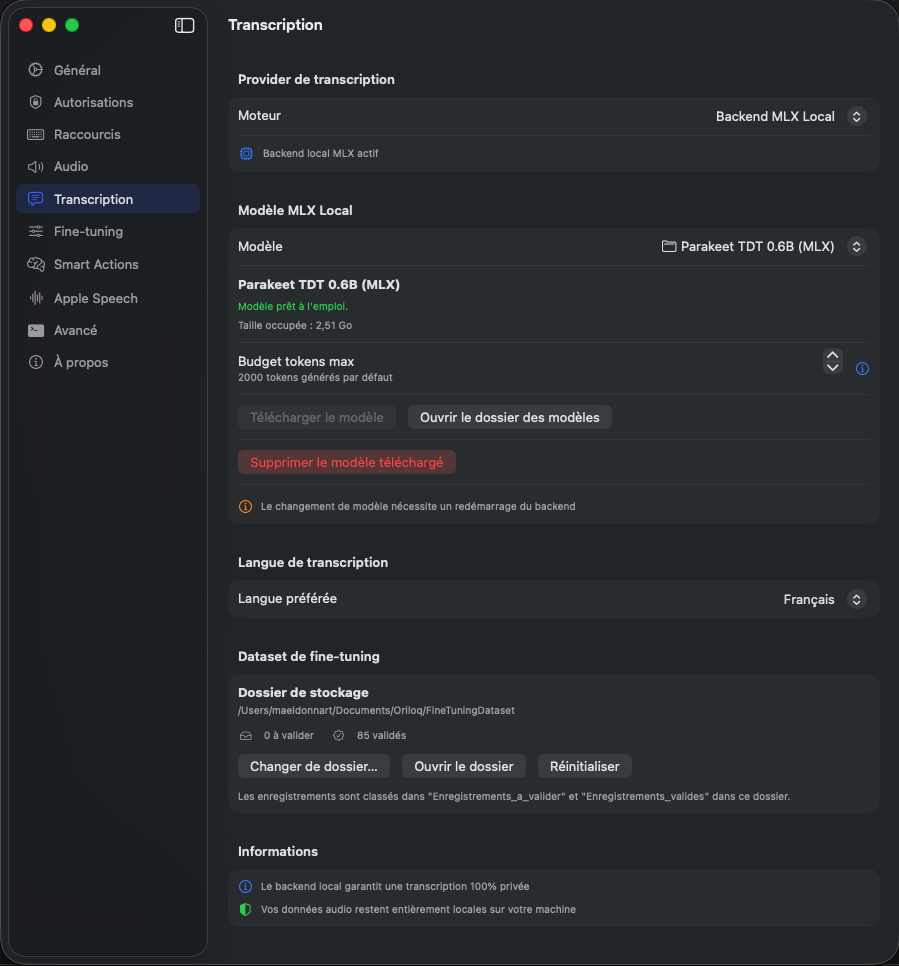
Transcription provider
Oriloq offers several transcription engines. Use the Engine dropdown to select the desired provider (e.g. Backend MLX Local). When a local backend is active, an indicator confirms its status. For new settings, dictation now waits three seconds of silence before stopping (1.0.25); your existing custom settings are preserved.
Local MLX Model
Select the transcription model via the Model dropdown. When a model is ready, Oriloq displays its status (“Model ready to use”) along with the disk space it occupies. Adjust the Max token budget to limit the number of tokens generated per transcription. Click Open models folder to access the directory in Finder. If the model has not been downloaded yet, click Download model to fetch it. Use Delete downloaded model to free up disk space. Note: changing the model requires a backend restart. Since 1.0.31, Oriloq rejects incompatible quantized Parakeet models before loading them, with a clear message.
Core ML and MLX variants
The model catalog clearly distinguishes the Core ML and MLX versions of transcription models, with separate labels and version metadata (1.0.30) — so you can pick the right variant without any ambiguity.
Adapter fine-tuned models
Support for adapter fine-tuned transcription models (1.0.29). The model manager shows disk size and weights size separately, so you can make an informed choice.
Transcription language
Set the Preferred language via the dropdown to tell Oriloq which language you primarily dictate in. This setting helps the model optimize speech recognition for the chosen language.
Fine-tuning dataset
This section lets you manage the storage folder for recordings used to fine-tune the transcription model. Oriloq shows the number of recordings pending validation and validated. Use Change folder… to select a different location, Open folder to access it in Finder, or Reset to restore the default path. Recordings are organized into the “Enregistrements_a_valider” and “Enregistrements_valides” subfolders.
Cloud providers (optional)
Since version 1.0.6, two cloud engines are available directly in the model selector, without enabling developer mode:
- →ElevenLabs Scribe — cloud transcription with per-word timestamps, automatic punctuation correction and accurate alignment (1.0.7).
- →Mistral Voxtral — Mistral's cloud engine.
Cloud results come back as coherent plain text. You can re-transcribe the same capture locally at any time if you prefer not to rely on the cloud.
Model memory management
Since version 1.0.11, an option lets you keep transcription models loaded in memory between dictations, for nearly instant launches. Unloading adapts automatically to your Mac's memory pressure: if the system needs RAM, Oriloq releases the model; otherwise, it stays ready.
A real-time memory usage indicator is available in the developer settings (since 1.0.6) to track the actual footprint.
Information
By default, your audio is processed locally on your machine and is never sent to Oriloq servers; optional, explicitly selected cloud engines send it to the chosen provider.