Text Corrections
Text Corrections
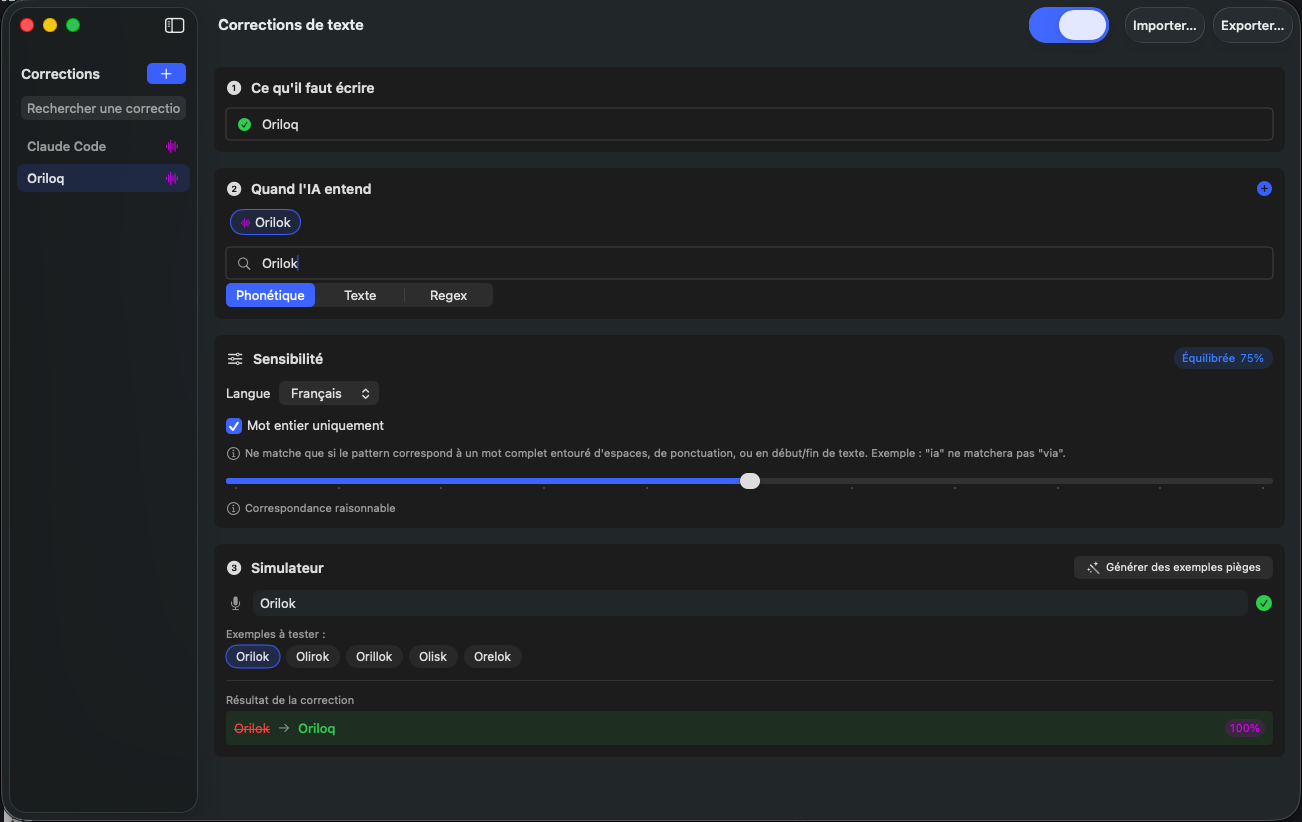
The text corrections screen lets you create automatic replacement rules to fix recurring transcription errors. You can define what the AI should write when it hears a specific word or phrase, and test your corrections in real time using the built-in simulator.
What to write
The first field lets you specify the corrected text, i.e., what Oriloq should write instead of the incorrectly transcribed word. For example, if the AI transcribes 'Orilok' instead of 'Oriloq', you enter 'Oriloq' in this field.
When the AI hears
The second field lets you specify one or more words the AI might transcribe incorrectly. You can add as many variants as needed for the same correction. For example, to correct 'Oriloq', you can add 'Orilok', 'Oriloc', 'Oriloque', etc.
Correction types
Three correction types are available: Phonetic to correct words that sound similar, Text for exact string replacement, and Regex for advanced matching using regular expressions. Phonetic mode is the most common for proper nouns and specialized terms.
Sensitivity
The Sensitivity section lets you fine-tune the correction behavior. You can choose the target language and enable the 'Whole word only' option to avoid false positives (e.g., preventing 'ia' from correcting 'via'). A sensitivity slider adjusts the matching tolerance level, ranging from strict to more flexible matching.
Simulator
The built-in simulator lets you test your corrections in real time. Enter a sample word and check whether the correction applies correctly. You can also use the 'Generate trap examples' button to automatically get close variants of the word to correct and validate the effectiveness of your rule.
Import and export
The 'Import' and 'Export' buttons at the top right of the screen let you save your corrections or share them with other Oriloq users. This makes it easy to deploy standardized corrections within a team or organization.
Enable or disable
The toggle at the top right of the screen lets you globally enable or disable text corrections and replacements when using Oriloq. When disabled, no correction rules will be applied to your transcriptions.
See also: Datasets to validate